
A real profile run, measured on a free Tesla T4 GPU. Model: microsoft/Phi-3-mini-4k-instruct (3.8B params).
Weights dominate — the textbook signal that quantization is the highest-leverage win.
INT8 frees 3.6 GB — enough to fit on a smaller, cheaper GPU.
Verdict: memory-bound. Bandwidth utilization edges out compute — every output token reads all weights from HBM, so smaller weights and faster memory help more than more FLOPs.
Measured ~0.41 MB per token — KV cache scales linearly with context length, the core driver of agentic-AI memory pressure.
Weights are 97% of peak. Measured INT8: 7.64→4.02 GB (47% smaller); peak 7.86→4.25 GB, freeing 3.6 GB.
Savings: 3.6 GB · Quality cost: ~<1% (bitsandbytes / AWQ / GPTQ)
Decode is memory-bandwidth-bound. Quantization and faster HBM help more than added FLOPs; batching amortizes the per-token weight read.
This run's KV cache is small (short prompt). KV grows ~linearly with context × concurrency — size it at your real workload to find the true ceiling.
{
  "model": "microsoft/Phi-3-mini-4k-instruct",
  "gpu": "Tesla T4",
  "fp16": { "weights_gb": 7.642, "kv_cache_plus_activations_gb": 0.215,
            "peak_total_gb": 7.857, "avg_compute_util_pct": 80.8,
            "avg_memory_bw_util_pct": 82.8, "memory_bound": true },
  "int8": { "weights_gb": 4.024, "peak_total_gb": 4.253, "memory_bound": false },
  "kv_by_tokens": { "128": 0.057, "512": 0.213, "1024": 0.42 }
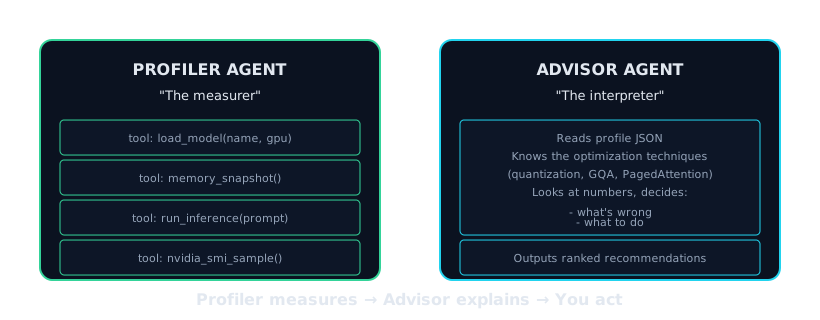
}A two-stage agentic pipeline. A GPU Profiler measures what's actually happening in memory on real hardware; an LLM Advisor then reasons over those measurements to produce ranked, quantified fixes. Profiling runs on-demand on a Modal GPU; the advisor runs on NVIDIA NIM.
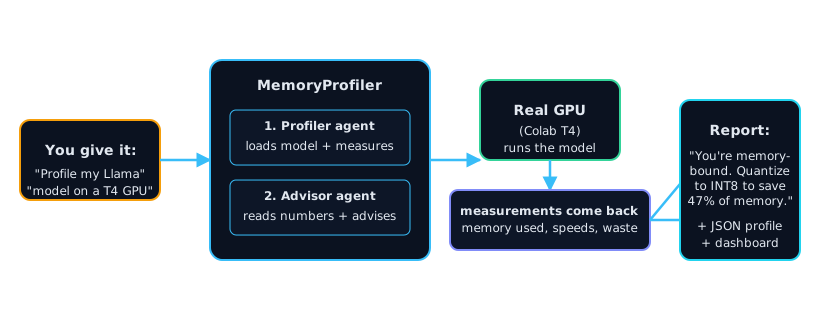
A user runs the memoryprofiler CLI or calls the FastAPI service with a model and a target GPU.
Loads the model on a real GPU and measures the memory split — weights vs KV cache vs activations — peak usage, and whether the workload is memory-bound or compute-bound.
Reads the measured profile and reasons over GPU economics, returning ranked, plain-English recommendations with quantified savings — no ML-performance engineer required.
Delivered as a CLI report, raw JSON, or this live dashboard — the verdict, headline savings, and ranked next steps.
We'll measure where your GPU memory and money go — and hand you a quantified plan.
Request an audit